Nullam dignissim, ante scelerisque the is euismod fermentum odio sem semper the is erat, a feugiat leo urna eget eros. Duis Aenean a imperdiet risus.

How Many Power Supplies Does an LED Screen Need Load Calculation, Redundancy and Cost Guide

How Many Power Supplies Does an LED Screen Need Load Calculation, Redundancy and Cost Guide

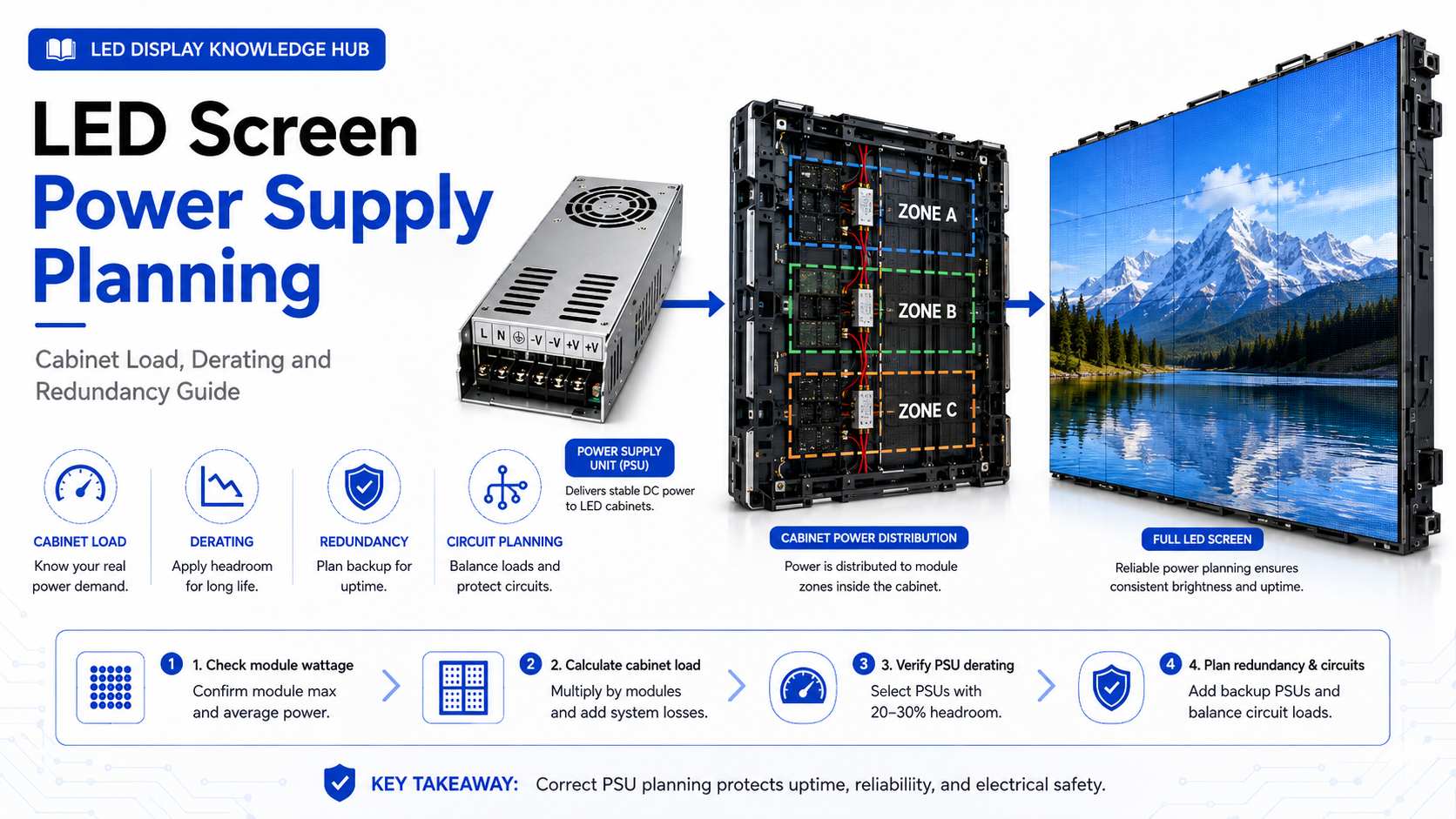
An LED display may contain dozens or hundreds of power supplies, depending on its size, module load, cabinet design, and required redundancy. Buyers sometimes estimate the quantity from screen area alone, but this can produce an inaccurate result. The power-supply layout should be calculated from the electrical load inside each cabinet, while total screen wattage is used mainly for upstream power distribution, circuit protection, generators, and electricity-cost estimates. A reliable design needs enough capacity for peak operating conditions without forcing each power supply to work continuously at an unsuitable load or temperature. It should also consider what happens when one unit fails.   Why Can’t Power Supply Quantity Be Calculated From Screen Area Alone? LED display specifications commonly provide average and maximum power consumption per square meter. These numbers are useful, but they serve different purposes. Longcheng‘s published guidance notes that maximum power consumption is more useful for electrical circuit design and safety planning, while average power consumption is more suitable for estimating normal electricity bills. What Should Determine the Number of Power Supplies? Inside a cabinet, the engineering calculation should begin with the maximum DC load of the LED modules and other components supplied by each PSU. Suppose the modules connected to one power supply can draw a maximum of 180 W. If the selected power supply is rated for 300 W under the actual installation conditions, the design load is 60% of its rated output. If the same PSU were assigned 295 W of maximum module load, the component count would fall, but the available margin would become much smaller. This could make thermal conditions and temporary peak loads more important. The correct margin should come from the specific power-supply datasheet and cabinet thermal design rather than from one universal percentage. Why Should an LED Power Supply Have Load Margin? Running a power supply below its absolute maximum rating can provide useful operating margin, particularly when cabinet temperatures rise or input conditions change. MEAN WELL’s display power-supply guidance specifically recommends adding margin to actual power usage when selecting a power supply to support longer service life. It also notes that rated output may need to be derated at elevated ambient temperatures.   Why Does Temperature Change the Calculation? A power supply mounted inside an LED cabinet does not operate in the same environment as a unit tested on an open workbench. Heat from LED modules, driver ICs, sunlight, enclosed cabinet space, and neighboring power supplies can raise the internal temperature. MEAN WELL gives an example in which a power supply requires output derating once ambient temperature rises above a specified level, and it stresses that thermal management should be considered during system design. This is particularly important for outdoor LED billboards and high-brightness screens. Increasing the PSU rating does not solve poor ventilation by itself; cabinet heat dissipation, airflow, installation orientation, and environmental temperature must be checked together.   How Do You Calculate the Required Power Supply Quantity? The safest method is to work from cabinet-level or module-level electrical data rather than multiplying screen area by a generic PSU count. What Is the Basic Calculation? First determine the maximum load connected to the power supply: Maximum assigned load = combined maximum load of connected modules and electronics Then check the usable output of the selected PSU under the expected temperature, input voltage, and installation orientation. The basic quantity can then be estimated as: Power supply quantity = total DC load ÷ approved usable load per PSU Always round upward, because a fraction of a power supply cannot be installed. For example, imagine one cabinet has 720 W of calculated maximum DC load. If the approved design allows each selected PSU to supply 240 W under the project’s conditions, the cabinet needs: 720 ÷ 240 = 3 power supplies If thermal derating reduces usable capacity, the calculation must be repeated. The electrical drawing should therefore be finalized after the actual cabinet configuration and PSU model are confirmed. Should LED Screens Use Power Supply Redundancy? Not every LED display needs the same level of redundancy. A small retail screen that can be serviced immediately has a different risk profile from a control-room wall, broadcast studio, stadium screen, or major outdoor advertising display. Redundancy should be treated as a business decision as well as an electrical one. When Does Redundancy Make Financial Sense? If one power-supply failure causes only a small non-critical section to go dark and the component can be replaced quickly, additional redundancy may provide limited financial benefit. If the display supports a live television production, ticketed event, high-value advertising contract, traffic information system, or another uptime-sensitive application, the cost of failure can be much higher than the cost of additional power hardware. Longcheng’s fault-handling process illustrates the operational importance of these components. Its service documentation treats individual damaged power supplies as replacement-level faults, while widespread power-supply or module damage is categorized as a more serious failure requiring on-site support. The design goal should therefore be to limit how much screen area is affected by a single failure and to make replacement straightforward.   How Does Power Supply Quantity Affect Cost and ROI? Using fewer power supplies can reduce initial component cost, wiring, connectors, cabinet space, and assembly labor. However, pushing each unit closer to its limit may increase thermal stress or enlarge the screen area affected by one failure. Using more supplies creates the opposite trade-off. Initial cost and component count rise, but each PSU may serve a smaller load zone and maintenance can become easier. Which Costs Should Buyers Compare? The useful comparison is total cost of ownership rather than PSU purchase price alone. Energy efficiency affects electricity cost and cabinet heat. Additional heat may increase cooling requirements, especially in outdoor or enclosed installations. Maintenance labor, spare stock, emergency shipping, access equipment, and advertising or event downtime can also exceed the price of the failed power supply itself. The cheapest design on a bill of materials is therefore not automatically the lowest-cost design over several years of operation. How Should Average and Maximum Power Be Used Differently? Confusing these two values is a common cause of inaccurate quotations and electrical planning. Which Value Matters for the Electricity Bill? Average consumption is more useful for estimating normal energy use because real video content does not keep every LED at maximum output continuously. Brightness settings, content color, ambient-light control, and daily operating hours all affect actual consumption. Maximum consumption serves a different purpose. Engineers use it to size circuits, cables, distribution equipment, breakers, and other infrastructure for demanding operating conditions. A project can therefore have a relatively moderate average electricity bill while still requiring electrical infrastructure capable of safely supporting a much higher peak load. How Many Spare Power Supplies Should a Project Keep? Spare PSU inventory should follow the same risk-based logic used for spare LED modules. A small indoor screen with local service support may need only a limited reserve. An overseas outdoor billboard, rental fleet, stadium screen, or revenue-critical installation should consider supplier lead time and the financial effect of downtime. Why Is Exact Compatibility Important? A replacement power supply should match required output voltage, current capacity, dimensions, connector arrangement, safety requirements, and operating environment. Replacing a PSU with a unit that merely “fits” physically can introduce electrical or thermal problems. Spare units should therefore be documented by project and cabinet type, stored in a dry environment, and tested as part of commissioning or scheduled maintenance. Conclusion The number of power supplies an LED screen needs cannot be determined accurately from screen size alone. The correct calculation starts with the maximum electrical load assigned to each power zone and then checks the selected PSU’s rated output under real operating temperature, input voltage, and installation conditions. Adequate load margin, sensible redundancy, good thermal design, and compatible spare stock can reduce failures and shorten repair time. Buyers should compare these benefits with initial hardware cost rather than simply minimizing the number of PSUs in the quotation. A well-designed power system protects more than the LED modules. It protects uptime, maintenance budgets, advertising revenue, event schedules, and the long-term return on the complete display investment. FAQs Can I calculate LED screen power supply quantity from watts per square meter? Watts per square meter is useful for estimating whole-screen power demand, but final PSU quantity should normally be calculated from the module and cabinet electrical layout. Each supply must be matched to the actual load connected to it. Should an LED power supply run at 100% load? A power supply may be rated to deliver its specified output under defined conditions, but project designers should follow the manufacturer’s load and temperature derating data. Adding appropriate margin can improve reliability, particularly in hot or enclosed cabinets. Do outdoor LED screens need more spare power supplies? They may justify a larger reserve because outdoor systems can have longer service lead times, difficult access, harsher temperatures, and higher downtime costs. The correct spare quantity depends on project scale, service response time, and operational importance.
How Many LED Modules Can One Receiving Card Control? A Load Capacity and Screen Planning Guide

How Many LED Modules Can One Receiving Card Control? A Load Capacity and Screen Planning Guide

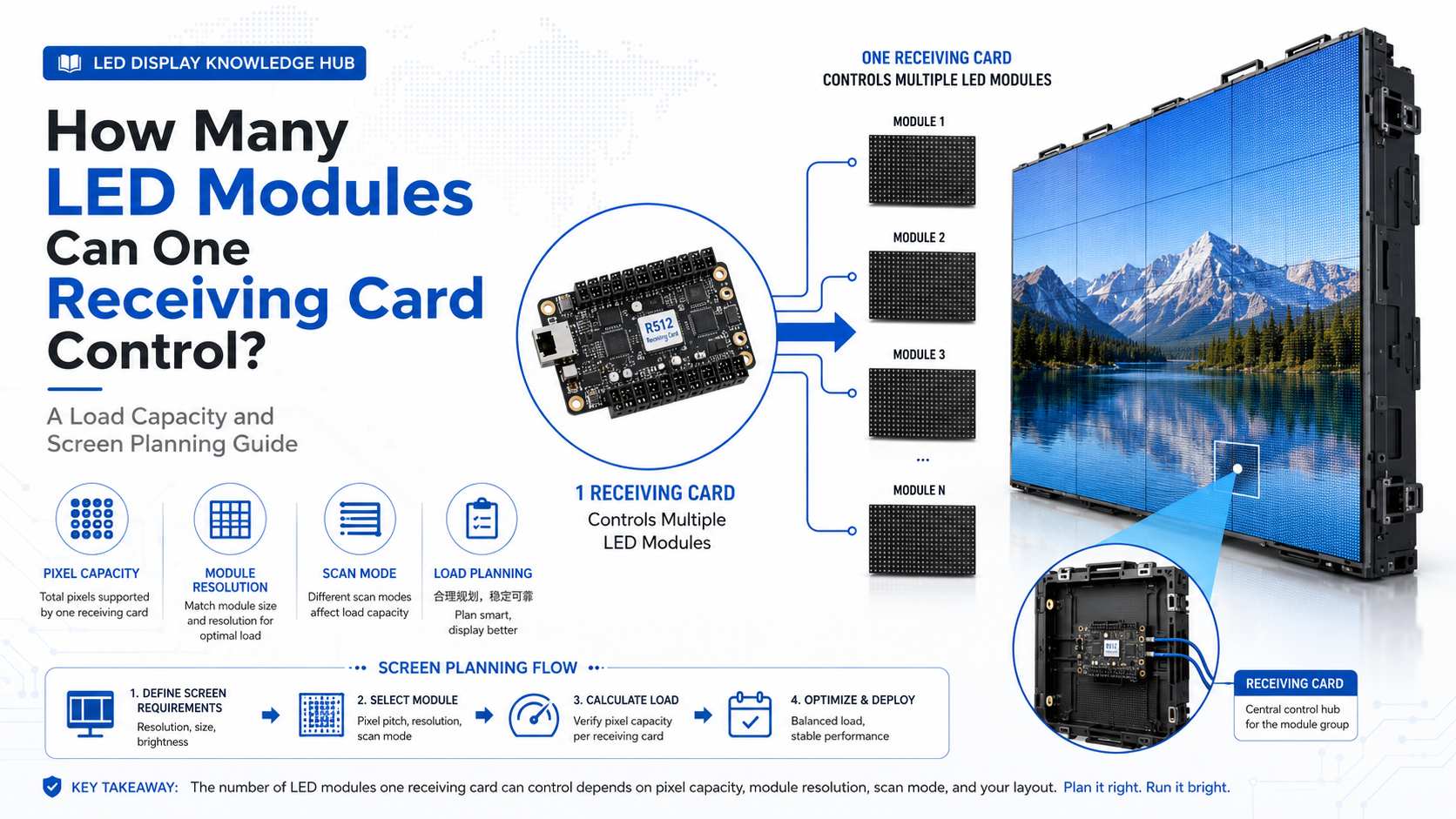
An LED receiving card is small compared with the cabinets, modules, and supporting structure of an LED display, but its capacity can directly affect screen stability, control-system cost, and future maintenance. One of the most common project questions is how many LED modules one receiving card can control. The answer cannot be determined from module quantity alone. Pixel resolution, scan mode, output interfaces, cabinet layout, and receiving-card specifications all need to be checked before the final configuration is approved. This is especially important for fine-pitch displays. As pixel pitch becomes smaller, the same physical screen area contains more pixels, so the receiving-card load can increase quickly even when the cabinet dimensions remain unchanged.   Why Is Pixel Capacity More Important Than Module Quantity? It is tempting to ask whether one receiving card can control four, eight, or sixteen LED modules. However, two modules with identical physical dimensions may have very different resolutions. The first calculation should therefore focus on pixels rather than module count. How Is Receiving Card Capacity Specified? Manufacturers normally publish a maximum loading capacity in pixels. NovaStar’s MRV Series provides a useful example. The MRV208-1 supports up to 256 × 256 pixels, while the MRV412-N, MRV416-N, and MRV532 are rated for up to 512 × 512 pixels. This means their theoretical maximum pixel loads range from 65,536 pixels to 262,144 pixels per receiving card. A separate NovaStar A7s Plus specification also lists a maximum loading capacity of 512 × 512 pixels, showing why pixel capacity is a more meaningful planning figure than a simple statement such as “one card controls several modules.” Suppose one LED module has a resolution of 64 × 64 pixels. It contains 4,096 pixels. From pixel count alone, a 512 × 512 receiving card theoretically has enough capacity for 64 such modules. However, this does not mean every installation can connect 64 modules to one card. Physical outputs, scan configuration, data groups, cabinet wiring, and allowable width and height still need to match.   How Can You Calculate LED Modules Per Receiving Card? A basic calculation gives the engineering team a useful starting point before the cabinet wiring diagram is created. The calculation should use the actual resolution of each module and the maximum loading capacity of the selected receiving card. What Formula Should You Use? First calculate the pixels in one module: Module pixels = module width in pixels × module height in pixels Then calculate the approximate module quantity permitted by pixel load: Theoretical module quantity = receiving card pixel capacity ÷ pixels per module For example, a 128 × 64 module contains 8,192 pixels. A receiving card rated for 262,144 pixels would theoretically have enough pixel capacity for: 262,144 ÷ 8,192 = 32 modules This result is only the first check. If the receiving card does not provide enough output channels for the planned wiring or if the required screen width exceeds the controller’s limit, the actual quantity must be reduced. What Else Limits Receiving Card Load? Pixel capacity is important, but it is only one part of the control-system design. Receiving cards have different numbers of RGB data groups, HUB interfaces, and scanning capabilities. Why Do Output Groups and Scan Mode Matter? NovaStar’s MRV product comparison illustrates these differences clearly. While several MRV models support a 512 × 512 maximum pixel load, the MRV412-N supports 24 parallel RGB data groups, the MRV416-N supports 32, and the MRV532 supports 40. All three may have the same headline pixel capacity, yet their interface configuration and practical application can differ. Scan mode also affects how data is distributed across the LED modules. A 1/16-scan module and a 1/32-scan module do not necessarily place identical demands on the control architecture. For this reason, a receiving card should never be selected only by comparing its maximum pixel number with the total module resolution. The actual cabinet wiring diagram should be verified in the LED configuration software before production.   Why Does Pixel Pitch Change Receiving Card Requirements? Smaller pixel pitch increases pixel density. This can significantly increase receiving-card requirements even when the physical screen dimensions stay exactly the same. Longcheng‘s published curved LED wall calculation provides a useful example. For an 8 m × 4 m LED wall, the calculated resolution is approximately 3072 × 1536 pixels at P2.604, compared with 2048 × 1024 pixels at P3.91. How Large Is the Difference? The P2.604 configuration contains approximately 4.72 million pixels, while the P3.91 configuration contains about 2.10 million pixels. In other words, the finer-pitch configuration has approximately 2.25 times as many pixels in the same physical screen area. That additional pixel load can affect receiving-card quantity, controller bandwidth, mapping complexity, data cabling, processor requirements, and total system cost. This is one reason why moving to a finer pixel pitch is not simply a matter of purchasing more densely populated LED modules. What Happens If a Receiving Card Is Overloaded? An overloaded or incorrectly configured receiving card can create problems that are difficult to diagnose after the screen has been installed. What Symptoms Can Appear? The problem may appear as incomplete image areas, unstable output, abnormal scanning, data loss, mapping errors, flickering, or sections of the cabinet that do not display correctly. In some situations, the hardware itself may be functional, but the control configuration exceeds the intended data layout. Trying to reduce receiving-card quantity simply to lower the initial quotation can therefore create higher commissioning and maintenance costs later. Longcheng’s published fault-handling process lists receiving cards among the components that may require replacement or repair when an LED screen develops a Level 2 hardware fault. This reinforces the importance of designing the control system for maintainability as well as initial operation. How Does Receiving Card Quantity Affect Project Cost and ROI? Using more receiving cards increases hardware cost, but reducing card quantity too aggressively does not automatically improve ROI. A better calculation considers hardware price, commissioning time, troubleshooting difficulty, spare inventory, downtime risk, and the labor required to replace a failed card. Is Maximum Loading Always the Best Design? Not necessarily. A card operating close to its theoretical maximum may reduce component count, but the wiring can become more complex and a single failure may affect a larger screen area. Using more receiving cards can sometimes create smaller control zones. This may make fault isolation and replacement easier. For rental screens, broadcast environments, control rooms, and other uptime-sensitive applications, that maintenance advantage may be worth more than the small reduction in initial component cost. Some receiving cards also support redundancy functions. NovaStar lists redundancy backup on several MRV models, which can be useful where screen interruption carries a high operational cost.   What Should Buyers Confirm Before Ordering Receiving Cards? A receiving-card quotation should be based on the final LED module and cabinet configuration rather than screen area alone. Which Project Data Should Be Checked? The engineering team should confirm module resolution, cabinet resolution, module quantity per cabinet, scan mode, control-system brand and model, required refresh rate, data interface, receiving-card output layout, processor capacity, and redundancy requirements. The number of spare receiving cards should also be included in the maintenance plan. A spare card is relatively inexpensive compared with the cost of keeping a commercial LED display offline while waiting for an international replacement shipment. Conclusion There is no universal answer to how many LED modules one receiving card can control. The correct number depends first on pixel load and then on scan mode, output groups, HUB configuration, cabinet wiring, and control-system limits. A 512 × 512 receiving card may theoretically handle 262,144 pixels, but the usable module quantity can be lower once the complete electrical and data layout is considered. Buyers should therefore calculate the screen from the module resolution upward instead of simply asking for the smallest possible number of receiving cards. A well-planned receiving-card layout may cost slightly more at the beginning, but it can simplify commissioning, reduce downtime, improve serviceability, and provide a more reliable foundation for the complete LED display system. FAQs How many LED modules can a 512 × 512 receiving card control? It depends on the resolution of each module. If one module is 64 × 64 pixels, pixel capacity alone would theoretically allow 64 modules. Actual quantity may be lower because output interfaces, scan mode, cabinet layout, and data-group limits must also be considered. Does smaller pixel pitch require more receiving cards? Usually, it increases the control load because smaller pixel pitch puts more pixels into the same physical area. Whether additional cards are required depends on the selected receiving-card capacity and cabinet configuration. Should LED screen projects keep spare receiving cards? Yes, especially for rental, advertising, stadium, and other commercial displays where downtime can cause financial losses. The spare card must match the installed control system and should have the correct configuration available for fast replacement.

How Many Spare LED Display Modules Should You Order for a Project?

How Many Spare LED Display Modules Should You Order for a Project?

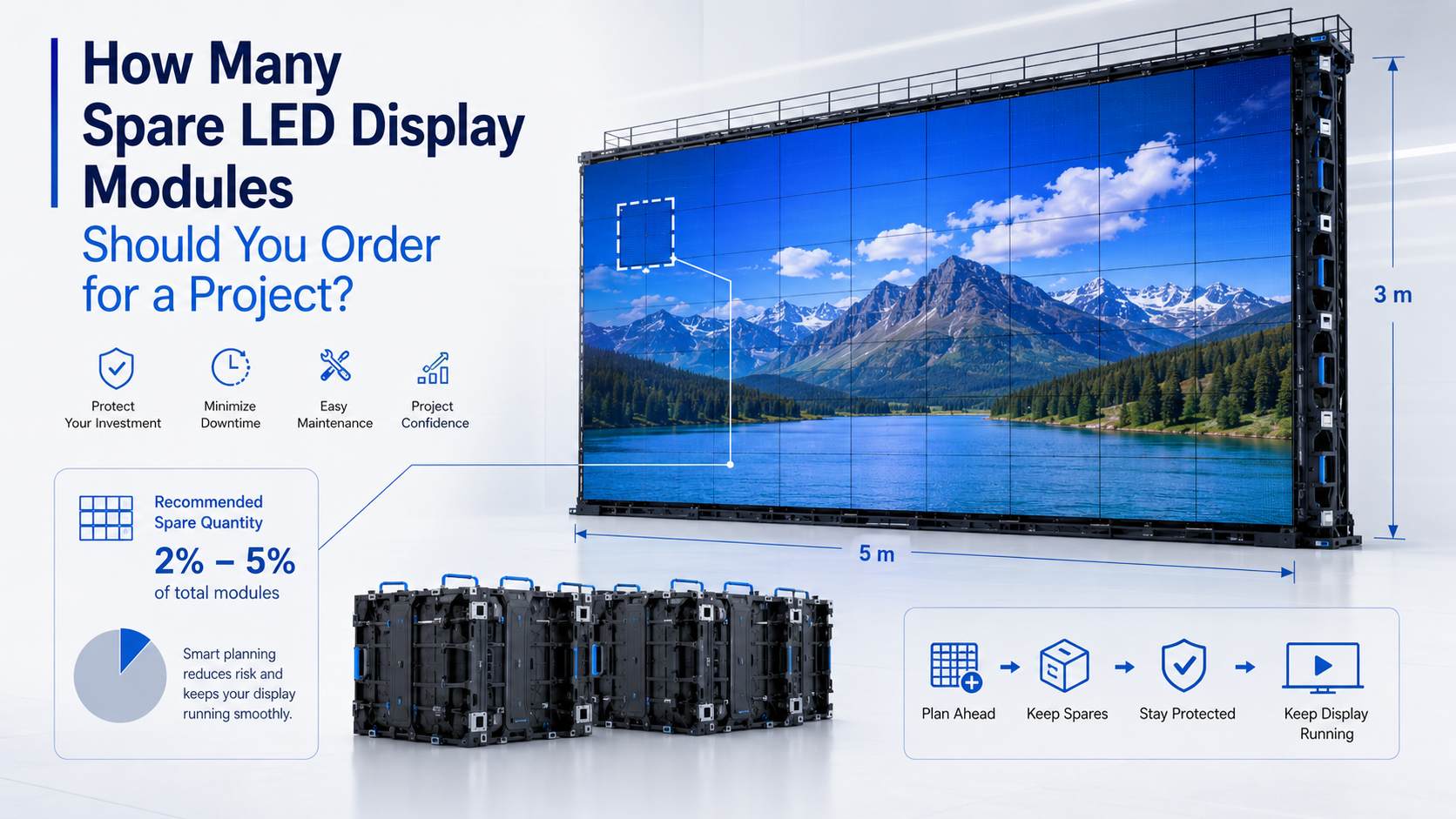
When people plan an LED display project, they mostly look at pixel pitch and brightness. They also check cabinet size, refresh rate, and total screen cost. Spare LED display modules get ignored a lot. This happens until something breaks after installation. A tiny module failure can cause obvious visual flaws. It can also lead to expensive downtime. This is very true for commercial displays. Rental screens, outdoor billboards, and stadium displays fall into this group. These revenue-generating systems need to stay active. For most projects, holding 2% to 5% spare LED display modules makes a good starting point. The final amount relies on a few details, though. You must look at your screen size and operating environment. Maintenance access matters too. You should also think about supplier lead time and the true cost of downtime.   How Many Spare LED Display Modules Do You Normally Need? You will not find one perfect percentage for every LED screen. A small indoor conference display carries a very low operating risk. Meanwhile, a rental screen travels a lot. An outdoor display faces heat, rain, and heavy humidity. These tough environments raise the risk of damage. Is 2% to 5% a Reasonable Range? For plenty of fixed LED installations, 2% to 5% works as a helpful guide. You do not have to treat it as a strict rule. Let us say a screen holds 500 modules. A 2% reserve gives you 10 spare modules. A 5% reserve gives you 25 modules. The gap in upfront cost stays quite small compared to the whole project value. That extra stock becomes highly valuable later. It saves you when replacement parts take weeks to arrive. The best quantity must reflect your chances of hardware failure. It must also match the financial impact of screen downtime. Which Projects Usually Need More Spare Modules? The project type drives your spare-parts planning. Some screens face frequent handling or harsh environments. Others deal with tough maintenance conditions or slow replacement lead times. These setups always demand a bigger reserve. Why Do Rental LED Displays Need More Spares? Workers constantly assemble and take down rental LED screens. They transport and install them over and over. This heavy action raises the chance of breaking things. LEDs, connectors, masks, and modules take a lot of abuse. For rental companies, a broken module costs more than just buying a new part. Sometimes the screen stays broken before the next big event. The operator loses precious rental income. They might also pay for emergency shipping and extra technician labor. Because of this, busy rental inventory needs extra spare modules. A fixed indoor installation just needs fewer parts. Why May Outdoor Screens Need More Spare Stock? Outdoor LED displays fight rain, dust, and deep humidity. They also handle wild temperature swings and long working hours. These rough conditions push up maintenance needs over the years. Getting to the screen matters a lot. A giant outdoor billboard might sit high up on a tall building. You might need special lifting gear and expert technicians to reach it. Waiting for late replacement parts extends your downtime. It drives up your repair bills too.   Why Is It Better to Order Spare Modules With the Original Screen? Some buyers delay buying spare modules. They just want to lower their early project budget. Buying replacements years down the road causes trouble, though. You will likely face weird compatibility and ugly color-matching issues. Why Does the Production Batch Matter? An LED module with the exact same pixel pitch and size is rarely a perfect match later. Factories change things over time. LED lamp batches, driver ICs, and PCB designs shift. Scan modes, connectors, and basic production settings evolve too. A new replacement might work perfectly on an electrical level. However, tiny shifts in brightness or color cause visual issues. The fresh module will look odd next to the older surrounding screen. Buyers must write down the exact module model and dimensions. They should track the resolution, LED package, and driver IC. Scan mode, voltage, and connector layout need tracking too. Buying your spare modules along with the original display remains the smartest move. It gives you the best chance of a flawless match.   How Do Spare Modules Affect Total Cost of Ownership? Extra modules surely raise the initial purchase cost. You must weigh this against the painful cost of screen downtime. What Costs Should Buyers Consider? The true cost of a module failure adds up fast. You might pay for emergency international shipping and expensive technician labor. You also need to rent access equipment. You suffer from lost advertising exposure and missed rental income. A short outage hurts paid campaigns on a commercial advertising screen. For a rental business, one damaged cabinet causes headaches. It directly shrinks the equipment pool ready for the next big event. Your main goal is not holding the absolute smallest inventory. You want to keep enough stock to drop your operational risk. You just want to do this without locking up too much cash. Should You Keep Other LED Display Spare Parts? Modules are not the only parts that stop an LED screen from working. Which Components Are Worth Stocking? Based on the project, buyers hold onto other parts too. They keep spare power supplies and receiving cards. They store data cables, connectors, and HUB boards. Module masks and tiny hardware pieces help as well. A cheap receiving card or power supply deserves a spot on your spare stock shelf. If it fails, a huge section of your screen goes dark. Spare-parts planning must focus on real operational impact. It should never focus on just the component price alone. How Can You Calculate the Right Spare Quantity? A risk-based approach works much better. Applying the exact same percentage to every single project fails in the real world. Which Factors Matter Most? Look at your total number of modules first. Next, think about your daily operating conditions and maintenance access. You must also check your replacement lead time and downtime cost. An indoor fixed installation enjoys fast local technical support. It can safely stay near the lower end of the 2% to 5% range. A stadium screen or outdoor billboard faces tougher lives. Remote installations and rental fleets need more protection. These setups easily justify a much higher reserve. Buyers need to verify how many modules go into each cabinet. This step makes calculating spare inventory much easier. You look at the full screen configuration. You avoid guessing based only on the total screen area. How Should Spare LED Modules Be Stored? Spare modules must stay easy to identify. They must remain fully usable during the entire service life of the display. What Information Should Be Recorded? You must link each spare module to its specific project. Record the pixel pitch, module model, and cabinet type. Note the production batch and purchase date as well. Keep the modules in a dry and safe room. Handle them carefully with proper electrostatic precautions. Testing several spare modules during the early commissioning phase helps a lot. You catch annoying compatibility problems right away. You fix them before the screen starts its long-term operation.   Conclusion For most commercial LED display projects, 2% to 5% spare LED display modules forms a solid starting range. Your final quantity must match your actual project risk. Indoor screens boast easy maintenance and quick supplier support. They demand fewer spares. Rental displays and outdoor installations face harder conditions. Stadium screens and revenue-critical LED walls need a bigger reserve. For these setups, downtime costs way too much money. The smartest plan involves ordering compatible modules early on. You should document the original screen configuration in detail. Store your spares the right way. Finally, add critical components like power supplies and receiving cards into your daily maintenance plan. FAQs How many spare LED modules should I order for a 1,000-module screen? If you use a 2% to 5% planning range, 20 to 50 spare modules makes sense. The final number changes based on your maintenance conditions. It also depends on your replacement lead time. Can I buy replacement LED modules several years later? Yes, you can. Finding an exact match gets much harder later, though. Factories update LED batches and driver ICs. They change PCB designs, brightness levels, and connectors over the years. Do I need spare power supplies and receiving cards too? Yes, you do for most commercial LED display projects. Keeping compatible power supplies and receiving cards on hand helps a lot. It cuts down your repair time. It also stops unnecessary screen downtime from hurting your business. Title: How Many Spare LED Display Modules Should You Order for a Project? Meta Description: Learn how many spare LED display modules to order, with 2%-5% planning guidance, downtime risks, storage, and maintenance tips. Keywords: spare LED display modules, how many spare LED display modules to order, spare LED modules for LED screen projects
Home
WhatsApp
Email
Contacts